> For the complete documentation index, see [llms.txt](https://xoul-ai-official-documentation.gitbook.io/xoul.ai-official-guide/llms.txt). Markdown versions of documentation pages are available by appending `.md` to page URLs; this page is available as [Markdown](https://xoul-ai-official-documentation.gitbook.io/xoul.ai-official-guide/navigation-and-information/subscriptions/memory-and-context.md).
# Memory & Context
This page explains what context limits are & how to estimate them.
On the subscription page the subscription tiers advertise "better memory". Here we're going to fully explain what "memory" means, explain how much better each tier of memory is, and explain the technical information behind how this works.
Each subscription is given a context limit. This is a finite limit on how much text the AI model will read.
* Free users: \~12,000 tokens.
* Green users: \~16,000 tokens.
* Purple users: \~24,000 tokens.
* Gold users: \~32,000 tokens.
You could say a Gold subscriber's memory is almost three times as large as a free user's memory, but that's not actually accurate because of the way context is allocated. With how the context is allocated, a Gold subscriber's memory will actually *feel* about 5-6 times as large as a free user's memory.
Let's explore why.
## A Cup of Water
When you press send in the chat Xoul.AI quickly compiles all the text from all the features that are currently in use in the chat into a document called 'the prompt' and this document is then sent to the AI model to read. We'll explore what gets included in this document in the next section.
{% columns %}
{% column width="25%" %}
{% endcolumn %}
{% column width="50%" %}
{% hint style="success" %}
The placeholder variable of `{{char}}` or `xoul` and `{{user}}` or `user` are also swapped for the relevant text during this stage.
{% endhint %}
{% endcolumn %}
{% column width="24.999999999999986%" %}
{% endcolumn %}
{% endcolumns %}
When the model reads the document, it will generate a *continuation* of the text it reads. What it generates is based directly on what ended up being included in the document. The continuation is the model's "response"- the "next reply" that appears within the chat.
This amount of context, how much text is available to be put into the prompt, is **shared** across all the features in use during a chat (e.g. Xoul, Persona, Scenario, Lorebooks, etc.). Once all of those text fields are populated into the document the *remaining amount* is filled with the most recent replies from the chat. Once the *total* context limit is reached, no other replies can be included- the document is full.
Think of it like a cup of water, there is a finite limit on the volume of liquid that can be contained by the cup. When the cup fills *it overflows*. This means you can keep pouring more liquid into the cup, forever, you just can't keep *all* of the liquid *inside* the cup forever.
What the model knows each time you press send is determined by what is in the cup at that moment. The model will **not** know anything about what *used* to be in the cup.
{% columns %}
{% column width="16.666666666666664%" %}
{% endcolumn %}
{% column width="66.66666666666667%" %}
{% hint style="info" %}
While calling it "forgetting" is a way to describe what it *feels like* when a reply is not included in the prompt document, the technical reality that the reply simply *wasn't included* is a powerful fact that helps users better understand how context is handled (and make more clever use of that context).
If you **need** the model to know something, you must be sure that information is in the prompt and you do so by using the Memories field.
[Memories Field](/xoul.ai-official-guide/navigation-and-information/navigation-and-interfaces/chat-interface/memories-field.md)
{% endhint %}
{% endcolumn %}
{% column %}
{% endcolumn %}
{% endcolumns %}
**Figuring out how many replies will be included is a complex question of:**
* How much context do I have?
* How much context does each feature I am using take up?
* This can, at best, be estimated.
* Roughly how many replies will fit in the remaining context after the text from the features have been included?
* This is an even bigger variable estimate based on how long replies are.
Without getting into the complication of how these amounts are estimated, let's just visualize the estimates.
## Context Visualized
### Free User Context
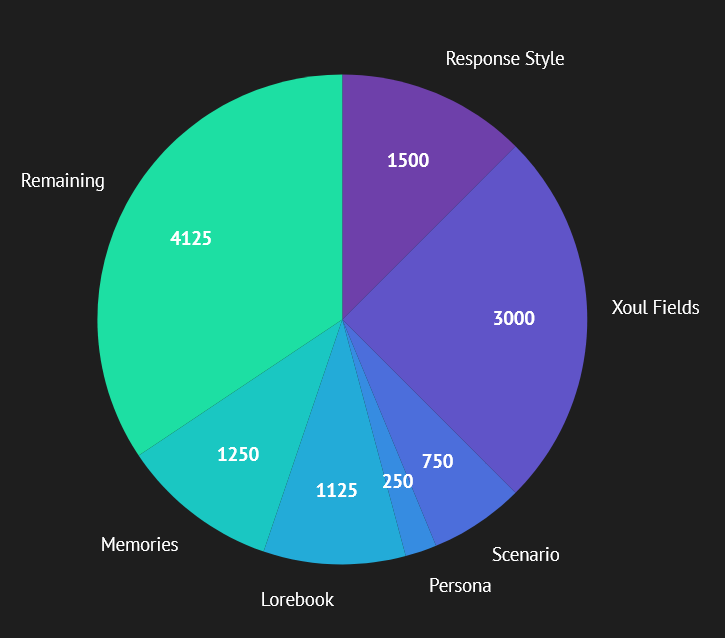
This represents the **expected maximum** use of the available context for a **free user** out of the 12k context available to them.
{% hint style="danger" %}
**These pie charts are ****ESTIMATES**** based on an expected ****MAXIMUM****.**
**Expected maximum usage is UNLIKELY to accurately represent the amount of context the average user is using. Consider this the "worst case scenario" pie charts.**
Xoul.AI's provided Response Styles are likely only 250-500 tokens.
Read the optional section below for more information.
{% endhint %}
Green Tier Pie Chart
## Green Context
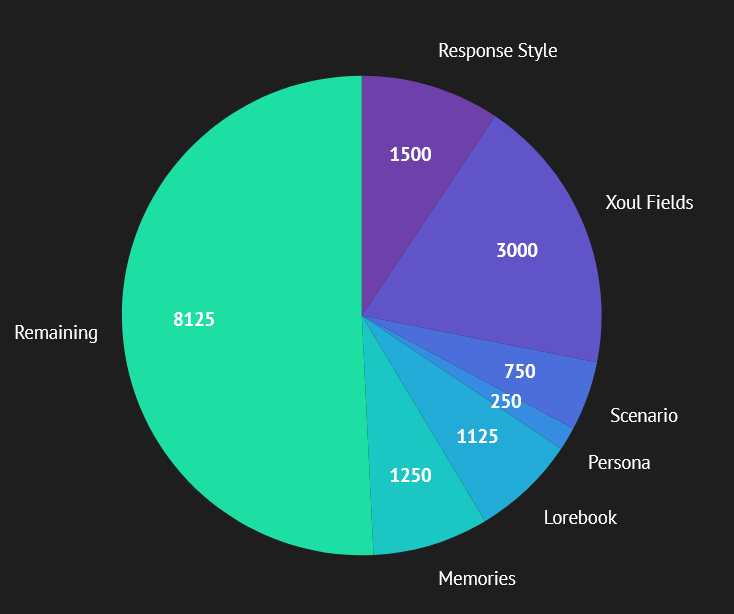
This represents the **expected maximum** use of the available context for a Green user out of the total 16k context available to them.
* Medium Replies: 55 replies read.
* Extra Long Replies: 16 replies read.
Purple Tier Pie Chart
## Purple Context
This represents the **expected maximum** use of the available context for a Purple user out of the total 24k context available to them.
* Medium Replies: 107 replies read.
* Extra Long Replies: 32 replies read.
Gold Tier Pie Chart
## Gold Context
This represents the **expected maximum** use of the available context for a Purple user out of the total 24k context available to them.
* Medium Replies: 150 replies read.
* Extra Long Replies: 45 replies read.
The **remaining** context is what's important to you. It is the amount left over in the document that can be filled with chat replies.
### Liquid Displacement
Have you ever ordered a cup of ice water from a restaurant, and they put a ton of ice in the cup, so you only got a few sips of water? Compared to a cup with less ice having a lot more water in it? It's the same principle with context!
The "remaining" pie slice represents how much liquid can go in the cup **after** you put in all the other features (the rocks).
Less rocks = more water. Less text inside the Xoul = more chat replies the model can read. This is what determines "how good the memory is", or at least how good it *feels*.
Why rocks? The model always has to read the Response Style, the Xoul, the Persona- this text always **permanently** takes up an amount of context. The chat replies can continue to be poured into the cup forever, but the old stuff will overflow out of the cup, thus making them more fluid so they're often called **temporary**.
{% hint style="success" %}
**Limitations are Not Arbitrary:**
* "Can we have higher character limits in Personas?"
* "Can we have higher character limits in Xouls?"
* "Can we pull more than three Lorebook entries?"
Are you sure you *actually* want that?
Okay, so clearly what you really want is a bigger cup, right?
Can the models handle a bigger cup?
Just like there is a limit to how much *you* are capable of paying attention to at once, models have limits too!
{% endhint %}
### How Many Replies?
That depends on how big the replies are!
These cups hold the same volume but contain a different *quantity* of objects, simply because the size of the objects in one container is smaller.
This chat bubble represents a reply with about 150 tokens of context. If all replies in your chat are about this length the document will include the **most recent 27 replies.**
However, this chat bubble represents a reply with 500 tokens of context. If all replies in your chat are about this length the document will include the **most recent 8 replies.**
In the end how long the reply is doesn't really matter, the volume the cup can hold remains the same. It's the same amount of text being read, it's just a different number of replies that text is spread across.
### Optional Additional Information
Context & Tokens Explained (OPTIONAL)
#### Context & Tokens
Context is a quantity of how many **tokens** the model can read. Tokens are how raw text gets converted into a readable format for the model. This text is tokenized into IDs representing everything from whole words to single characters.
When THIS text is converted into tokens it looks like this to the model.
This is a string of token IDs. The model *writes and reads* tokens.
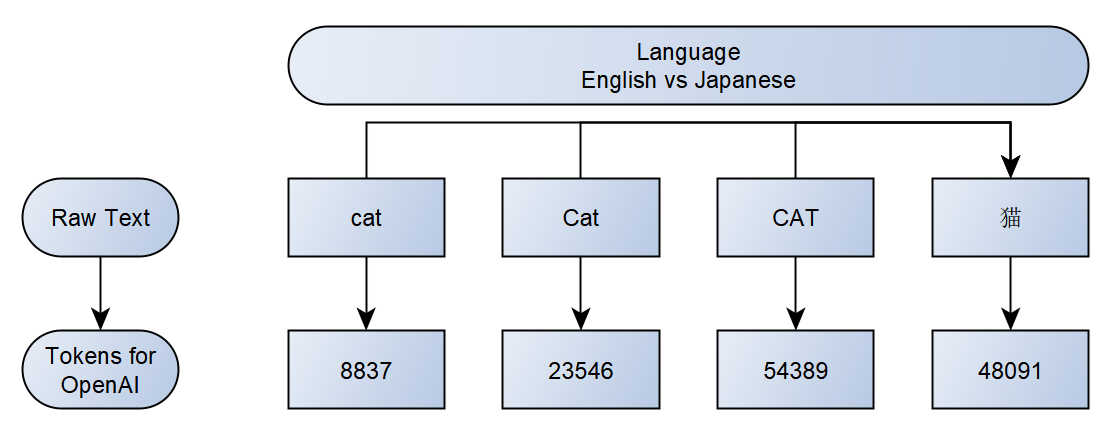
Just like different languages have different words for the same thing, different models have different token IDs for the same thing:
* English: `cat`
* Japanese: `猫`
* OpenAI: `8837`
* Another Model: `424`
While `8837` is the token ID for `cat` in on OpenAI, `Cat`, `CAT`, and even `猫` has unique token IDs.
However, models only *type* text, so they also have "words" (token IDs) for things like `.` and `,` and `]` and these tokens take up just as much space as any other token.
If a model can only read 10 tokens, it doesn't matter *what exactly* those 10 tokens are, it will only read 10.
`1` `2` `3` `4` `5` `6` `7` `8` `9` `10` = 10 tokens.
`contained` `sentence` `characters` `paragraphs` `examples` `demonstrated` `visualize` `language` `written` `tomorrow` = 10 tokens.
`This` `is` `a` `sentence` `and` `it` `contains` `ten` `tokens` `.` = 10 tokens.
#### The Average Token
As you might have noticed each of those three 10 token examples contained a wildly different number of characters. This is why characters =/= tokens. They only have an *average* relationship.
A few paragraphs written in natural language can be quantified by the number of characters it took to type the text. This is every letter, symbol, number, space *and* line break (pressing enter) typed to create the text.
You'll find, when using natural language, that you can divide the number of characters in that text by 4 and get a pretty close *estimate* of how many tokens that text will likely be. As demonstrated by OpenAI's tokenizer which helps us visualize text into tokens:
{% hint style="warning" %}
Some words (e.g. `press` `ing`) are two tokens! **Not all words will be a one token**. This, and those `.` and `'s` tokens are why words =/= tokens.
{% endhint %}
#### Estimating Context
It's simple math, just highly variable and can only give *estimations*.
To make things simple just divide the character limit of the text fields of any features you use by 4 for the maximum usage situation or estimate 25-75% character limit usage for each text field to get more flexible values.
In the end the amount of replies the AI model can read in the chat can be:
* Free users: 8-50 replies.
* Green users: 16-78 replies.
* Purple users: 32-131 replies.
* Gold users: 45-185 replies.
This is maximum use + extra-long replies VS moderate use + medium replies.
{% hint style="warning" %}
If you encounter a chat with a Xoul that seems to have particularly poor memory, the issue might be how the text of the Xoul was written.
{% endhint %}
#### Bonus: Context Limit vs Window
The **Context Limit** is the maximum number of tokens included in the prompt. (The cup size)
The **Context Window** is how much the model can actually pay attention to at any given time. (How big of a cup the model *can* handle.)
{% hint style="info" %}
In ideal cases you want the cup size to be at or below the size of a cup the model can *comfortably* handle.
You may be able to lift 200lbs for a few seconds before you put it back down, but can you comfortably carry around 200lbs of weight all day long?
Just because a model *can* handle 265k tokens doesn't mean it will handle that well. Most are best at handling 32k tokens.
{% endhint %}
Models tend to demonstrate a strong ability to recall information from near the beginning of the context, and from near the end of context, but less reliably recalls information smack dab in the middle. Most models will be able to handle 32k context perfectly fine, but beyond that their ability to recall the information midway through the prompt gets fuzzier and less reliable.
Improving a model's ability to handle larger contexts is, in the end, costly and shows diminishing returns. Instead, exploration of other technology to handle *which* tokens end up being shown to the model (e.g. using Retrieval-Augmented Generation) has proven to be a much more functional, affordable and scalable method of expanding the limitations of Large Language Model's context windows.
Bonus Cheat Sheet: Character Limits & Context
**Response Style**
* Maximum 6000 characters.
* Expected use 2000-4000 characters.
**Xouls** (only one Xoul will be included at a time, even in Group Chats)
* Maximum 12000 characters (Description, Advanced Definition & Chat Samples)
* Maximum 17000 characters (for Gold Subscribers)
* Expected use varies significantly.
**Personas**
* Maximum 1000 characters.
* Maximum 2000 characters (for Gold Subscribers)
* Expect maximum use.
**Xoul Intro**
* Maximum 1000 characters.
* Expected not to be used at all, overwritten by a Scenario, or maximum.
**Scenario** (which will overwrite the Xoul Intro)
* Maximum 3000 characters.
* Expected use 500-1500 *if* used at all.
**Lorebooks**
* Entry Maximum 1500 characters.
* Will always pull 3 Entries in a chat *if* a Lorebook is active.
* Expected us 250-1000 characters. Highly variable in terms of *which* three will be pulled.
**Memories**
* Maximum 5000 characters.
* Expected use 0-25% or 75-100%, depends on the user.
**Chat Replies** (The Greeting is a chat reply)
* User Reply maximum 1500 characters.
* Model Reply maximum 3500 characters.
* Expected use is highly dependent on user behavior & preferences. Model will read both replies from the user and itself, so this needs to be divided by two to get the "average chat reply" amount.
**Subscription Context**
* Free: \~12,000 tokens
* Green: \~16,000 tokens.
* Purple: \~24,000 tokens.
* Gold: \~32,000 tokens.
***
## In Conclusion
Context is a big, variable math problem that requires a basic understanding of what a token is to really make sense of, which is a lot to have to learn and take in, especially when you're first starting using AI models.
The long and short of it is that this memory will feel different to every user, and ever chat they do, but in general you can expect it to feel like the model remembers:
* **Free users:** 8-50 replies. Expect an average of 15-20.
* **Green users:** 16-78 replies. Expect an average of 25-30.
* **Purple users:** 32-131 replies. Expect an average of 45-50.
* **Gold users:** 45-185 replies. Expect an average of 65-70.
{% hint style="success" %}
Make use of the Memories field in settings panel, located within a chat, to keep relevant details in context to make these limitations more functional.
↳ [Memories Field](/xoul.ai-official-guide/navigation-and-information/navigation-and-interfaces/chat-interface/memories-field.md)
{% endhint %}

 send in the chat Xoul.AI quickly compiles all the text from all the features that are currently in use in the chat into a document called 'the prompt' and this document is then sent to the AI model to read. We'll explore what gets included in this document in the next section.
{% columns %}
{% column width="25%" %}
{% endcolumn %}
{% column width="50%" %}
{% hint style="success" %}
The placeholder variable of `{{char}}` or `xoul` and `{{user}}` or `user` are also swapped for the relevant text during this stage.
{% endhint %}
{% endcolumn %}
{% column width="24.999999999999986%" %}
{% endcolumn %}
{% endcolumns %}
When the model reads the document, it will generate a *continuation* of the text it reads. What it generates is based directly on what ended up being included in the document. The continuation is the model's "response"- the "next reply" that appears within the chat.
This amount of context, how much text is available to be put into the prompt, is **shared** across all the features in use during a chat (e.g. Xoul, Persona, Scenario, Lorebooks, etc.). Once all of those text fields are populated into the document the *remaining amount* is filled with the most recent replies from the chat. Once the *total* context limit is reached, no other replies can be included- the document is full.
Think of it like a cup of water, there is a finite limit on the volume of liquid that can be contained by the cup. When the cup fills *it overflows*. This means you can keep pouring more liquid into the cup, forever, you just can't keep *all* of the liquid *inside* the cup forever.
send in the chat Xoul.AI quickly compiles all the text from all the features that are currently in use in the chat into a document called 'the prompt' and this document is then sent to the AI model to read. We'll explore what gets included in this document in the next section.
{% columns %}
{% column width="25%" %}
{% endcolumn %}
{% column width="50%" %}
{% hint style="success" %}
The placeholder variable of `{{char}}` or `xoul` and `{{user}}` or `user` are also swapped for the relevant text during this stage.
{% endhint %}
{% endcolumn %}
{% column width="24.999999999999986%" %}
{% endcolumn %}
{% endcolumns %}
When the model reads the document, it will generate a *continuation* of the text it reads. What it generates is based directly on what ended up being included in the document. The continuation is the model's "response"- the "next reply" that appears within the chat.
This amount of context, how much text is available to be put into the prompt, is **shared** across all the features in use during a chat (e.g. Xoul, Persona, Scenario, Lorebooks, etc.). Once all of those text fields are populated into the document the *remaining amount* is filled with the most recent replies from the chat. Once the *total* context limit is reached, no other replies can be included- the document is full.
Think of it like a cup of water, there is a finite limit on the volume of liquid that can be contained by the cup. When the cup fills *it overflows*. This means you can keep pouring more liquid into the cup, forever, you just can't keep *all* of the liquid *inside* the cup forever.