> For the complete documentation index, see [llms.txt](https://xoul-ai-official-documentation.gitbook.io/xoul.ai-official-guide/llms.txt). Markdown versions of documentation pages are available by appending `.md` to page URLs; this page is available as [Markdown](https://xoul-ai-official-documentation.gitbook.io/xoul.ai-official-guide/navigation-and-information/navigation-and-interfaces/chat-interface/custom-engine-proxy.md).
# Custom Engine (Proxy)
The basics of setting up a proxy for use on Xoul.AI.
## Settings
### Engine Name
A custom name for the model you'll be using. This will display as the saved engine setting so you can easily reuse it later without having to set it up again.
### Provider
The provider that this model is being run through.
**Options include:**
* Featherless
* Subscription based service. Prices begin at $10/mo and provides access to many models.
* TogetherAI
* Rate limited free models available. Otherwise, pricing is [per-token model](https://www.together.ai/pricing).
* InformaticaAI
* Free to low cost options for personal use.
* OpenRouter
* Free and pay-as-you go-options.
* Chutes
* Subscriptions and pay-as-you-go options.
* Generic
* Once Generic is selected the Base URL field will appear.
### API Key
You'll need to obtain a unique key (a string of letters and numbers in a specific format) that will grant you access to the model you're attempting to use.
Do not share your API key. Keep it private or someone else will be able to access the model and use it as if they are you.
### Model Name
You'll have to select or type & select a model from the list, which will be based on the provider used.
### System Prompt
Provide a system prompt for the model to use.
{% hint style="info" %}
Xoul.AI's Response Styles and creator system prompts are not available with proxy use because proxies can leak this information.
{% endhint %}
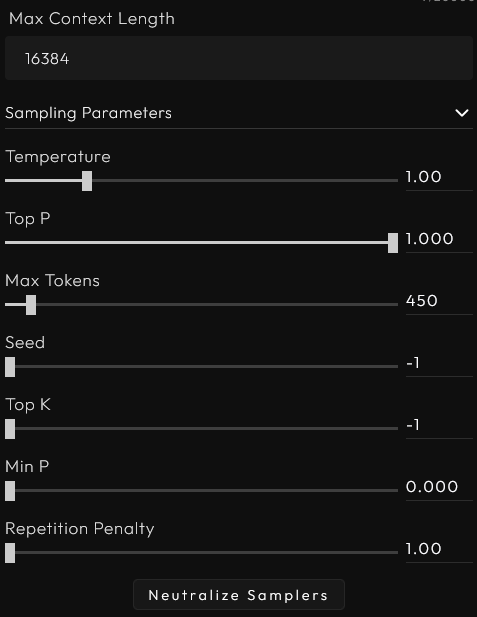
### Max Context Length
Based on the model you use you may be limited to a certain context length or if you're paying for the model use, using a smaller context limit can reduce the cost for each API call (response from the model).
## Sampling Parameters
Temperature, Top P, and other settings. Its best to find the recommended settings for the model you're using and start from there.
### **Temperature**
**What it is:** Controls the *randomness* of the output.
* **Low temperature (e.g., 0.2):** Makes the model more deterministic and focused on the highest-probability word. Outputs tend to be more repetitive and safe.
* **High temperature (e.g., 1.0 or higher):** Makes the model more creative and unpredictable. The AI might choose less likely words, leading to more varied (but sometimes nonsensical) text.
**Effect:** Higher temperature = more randomness/creativity; lower = more focused/predictable.
### **Top P (Nucleus Sampling)**
**What it is:** Instead of considering *all* possible next words, the model only picks from the smallest set of words whose *combined probability* reaches **P**.
* **Example:** If `Top P = 0.9`, the model adds up probabilities of the most likely words until the sum is 0.9, then randomly samples from that group (ignoring the rest).
* **Low Top P (e.g., 0.5):** Very narrow selection → conservative output.
* **High Top P (e.g., 0.95):** Broad selection → more diverse.
**Note:** Often used *instead of* Top K, but sometimes together with Temperature.
### Max Tokens
**What it is:** The maximum allowed number of tokens the model may use to generate a reply. If the model may only generate 10 tokens, but attempts to generate 50, the reply will abruptly cut off at the 10th token.
**Recommended:** Max Tokens should not exceed 875 tokens.
The reply from the model on Xoul.AI is limited to 3500 characters. While a proxy can generate more text than that, attempting to edit a reply that contains more text than the system is designed to allow will prevent you from being able to save the edited reply.
### **Seed**
**What it is:** A number that initializes the random number generator.
* **Same seed + same settings + same prompt = identical output** (deterministic).
* Different seed = different random choices, so output varies.
* Useful for reproducibility in testing.
### **Top K**
**What it is:** The model only considers the **K** most likely next words, and samples randomly from them.
* **Example:** `Top K = 3` means only the top 3 predicted words are candidates.
* **Low K (e.g., 1-10):** Very restrictive, can get repetitive if K is too low.
* **High K (e.g., 50-100):** Allows more variety but maybe less coherence if too high.
**If K = 1**, the model always picks the top word (like very low temperature).
### **Min P**
**What it is:** A newer method (used in some models like Llama).
* Ignores words with probability less than a **minimum percentage** of the top word’s probability.
* **Example:** `Min P = 0.1` → any word with probability less than 10% of the top word’s probability is ignored.
* Helps avoid sampling very low-probability nonsense while keeping flexibility when many words are similarly likely.
### **Repetition Penalty**
**What it is:** Penalizes words that have already been used recently, to avoid loops.
* **Value > 1.0 (e.g., 1.2):** Reduces probability of recent tokens being chosen again.
* **Too high (e.g., 1.5+):** Can make output unnatural because it avoids common words.
* Helps prevent the model from repeating the same phrase over and over.
## **How They Influence Each Other**
* **Temperature vs. Top P / Top K / Min P:**\
Temperature reshapes the entire probability distribution before sampling; Top P/K/Min P then *restrict* which words can be sampled from.
* **Common combo:** Temperature = 0.8, Top P = 0.9 → balanced creativity & coherence.
* **Top P vs. Top K:**\
Both limit the sampling pool. If you set both, the stricter one applies. Usually people use one or the other (Top P more common now).
* **Min P** can be seen as an adaptive Top P — it changes threshold based on top word’s probability.
* **Repetition Penalty** modifies probabilities *after* Temperature/Top P filtering, to discourage repeats.
### **Typical Use Cases**
* **Factual Q\&A:** Low temp (0.1–0.3), low Top P (0.5–0.7), repetition penalty \~1.1.
* **Creative writing:** Temp 0.7–1.0, Top P 0.8–0.95, maybe higher penalty to avoid loops.
* **Code generation:** Often low temp, Top P \~0.95, seed fixed for reproducibility.